

Authentication
Sign-in methods, expiry times, portal language, and optional SMTP for a VisitorHub portal.
On the Authentication tab you define how guests sign in to this portal and which language the portal starts in.
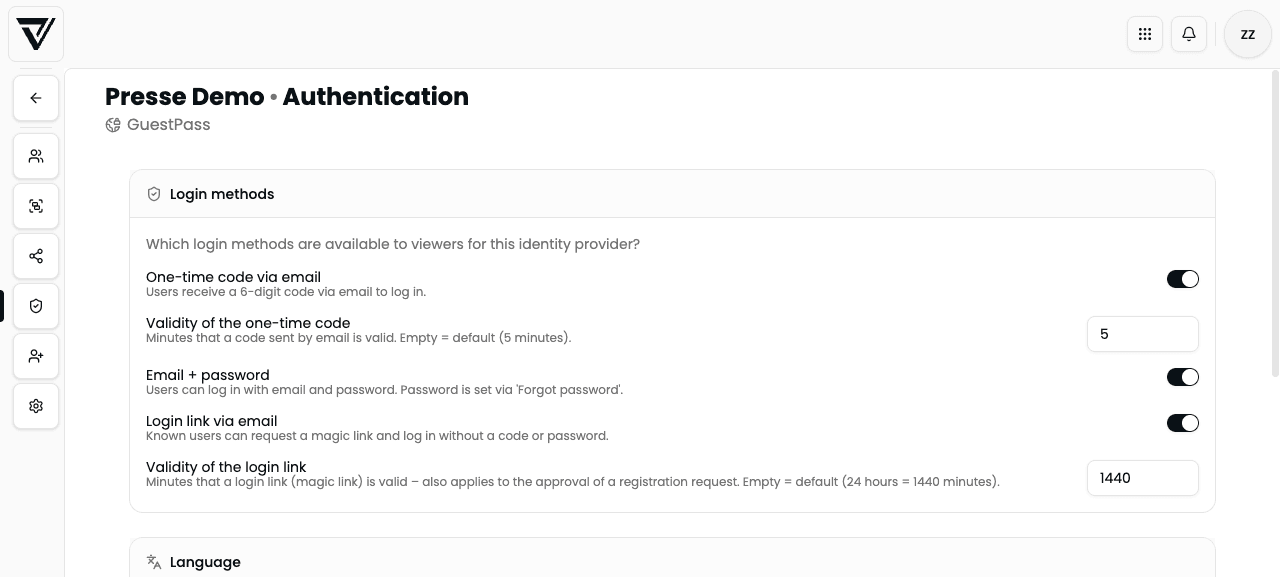
Sign-in methods
You can enable each method independently. Changes are saved immediately.
One-time code by email
Users receive a 6-digit code by email and enter it in the sign-in form.
- Code validity – in minutes (default: 5 minutes if left empty)
Email + password
Users sign in with email and password. The password is set or reset via Forgot password – you do not need to set it in advance.
Sign-in link by email (magic link)
Known users can request a magic link and sign in without a code or password.
- Link validity – in minutes (default: 1440 = 24 hours)
- The same validity applies when you approve a registration request (the approval link in the email)
A magic link can be redeemed only once. If it expired or was already used, the person must request a new one. If they open the link in a different browser/device than the one where they requested it, they must confirm sign-in once more – so email scanners do not “burn” the link.
At least one sign-in method should be enabled, otherwise guests cannot sign in. Magic link and code are often the most convenient combo for press and partners; password works well when the same people return often.
Portal default language
Under Language you set the default language the portal starts in – for the sign-in screens and the content behind them, as long as the viewer has not chosen a language themselves.
Options:
- Automatic (browser language)
- German, English, Spanish, French
The viewer’s own language choice and a share’s default language take precedence over the portal default.
Email delivery (SMTP)
Further down the tab you find Email delivery (SMTP). It controls which server sends this portal’s auth emails (OTP, magic link, password reset, registration mail).
| Setting | Meaning |
|---|---|
| Active (toggle) | On: custom SMTP for this portal. Off + save: config is cleared; VAULO uses the default relay again |
| Host | SMTP server, e.g. smtp.example.com (required when active) |
| Port | e.g. 587 (submission) or 465 (SMTPS); form default: 587 |
| Force TLS/SSL (port 465) | When on: encrypted connection (typical for port 465) |
| User | SMTP login (required) |
| Password | SMTP password (required) |
| From email | From address recipients see (required), e.g. press@your-company.com |
| From name | Optional display name in the From field |
| Reply-To | Optional reply address |
Save applies to the whole SMTP config at once. Required when active: host, user, password, from email.
Custom SMTP is useful when the from-address and reputation should match your domain. Mail content (subject/HTML) is edited under Settings → Email notifications – SMTP only controls transport.
See also
- Settings – registration mode, email templates, and sign-in copy
- Registration requests – approve and decline
- Guest login – flow from the recipient’s point of view